QuickParent
2001
QuickParent is a plug-in for Lightwave 6.0 or greater. It provides some alternate ways to parent items to each other. It contains 8 plug-ins in total: Chain Parent (First), Chain Parent (Last), Multi-Parent (First), Multi-Parent (Last), UnParent, Insert Into Hierarchy, Remove From Hierarchy and About QuickParent. All of these are fully compatible with Lightwave 6.5's Parent In Place feature. This plug-in requires Lightwave 6.0 or greater.
Click here to download QuickParent101 KB
Installation
To install QuickParent, just follow these steps:
- If any copies of Layout are running, quit them now.
- Create a new directory in your Lightwave Plugins directory called TMPro and copy QuickParent.p into it.
- Load Layout
- Select Add Plug-ins.
- Find and add QuickParent.p. Layout should report that eight plug-ins have been added.
- Quit Layout. This will update your Lightwave config and ensure that everything works properly.
- The next time you run Layout, you can launch the QuickParent plug-ins from the Generics pop-up in the Plug-in Options Panel, or assign them to keys or buttons on the interface with Configure Keys and Configure Menus. Please refer to your Lightwave documentation for more information. The plug-ins will be prefixed with TM_P under the Plugins heading of the Configure Keys and Configure Menus panels.
Chain Parent (First) Chain Parent (Last)
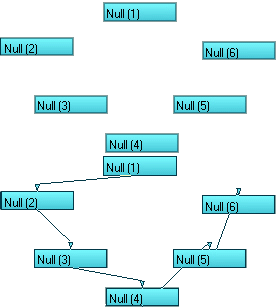
Chain Parent (First) and Chain Parent (Last) parent the selected items to each other in the order they were selected, or in reverse order in the case of Chain Parent (Last). The root parent will be the only selected object after it's finished. Since Layout will only allow you to multi-select items of the same type, the Chain Parent plug-ins can only be used to parent like items.
Multi-Parent (First) Multi-Parent (Last)
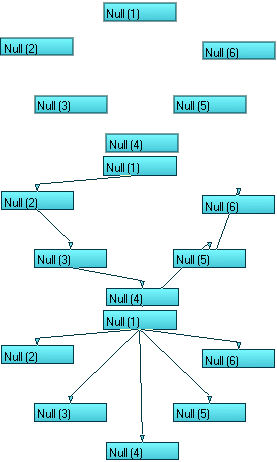
Multi-Parent (First) and Multi-Parent (Last) parent the selected items to the first or last selected item, respectively. The root parent will be the only selected object after it's finished. Since Layout will only allow you to multi-select items of the same type, the Multi-Parent plug-ins can only be used to parent like items.
UnParent
UnParent returns the selected items to their original, unparented states. Once finished, all items will remain selected.
About QuickParent
About QuickParent is just here to remind you where you got these plug-ins from in the first place.